Hierarchy of Configuration File
All the modules used in an algorithm can be easily set in the configuration file with yaml format.
Below a simple algorithm is taken as example for presenting the hierarchy of
configuration file. Commonly the whole yaml file can be separated to 6 main
parts: engine, algorithm, train_cfg, test_cfg, data and
runtime. For special parts like engine, algorithm and data, they
must include key of type, which indicates the name of “engine class” for use.
Other parameters for building module can be followed after the type key with
format of key: value. Especially, In the part of runtime, workflow
phases are assigned here, for instance, setting of it
work_flow: [['train', 2], ['val', 1]] means the engine runs every one
validation phase after every two training epoch.
Tip
The names of workflow phases must correspond to the names of instance methods
implemented inside engines. For example, as for task of
Multi Targets Tracking, ‘test_emb’ (testing ReID network) or ‘test_det’
(testing Detector) can be added to the work_flow without modifying another
setting of configuration file only if they are attributes of engine instance.
More details are elaborated in chapter of engine.
# YAML Configuration File

engine:
    type: <Class Name of Engine>
algorithm:
    type: <Class Name of Algorithm>
    ...
    backbone:
        type: <Class Name of Backbone Module>
        ...
    head:
        type: <Class Name of Head Module>
        ...
    ...
train_cfg:
test_cfg:
train_pipeline:
val_pipeline:
test_pipeline:
data:
    type: <Class Name of Data Module>
    ...
runtime:
Feature of Every Part
Parts |
Features |
|---|---|
Engine |
Preparing and Executing work flows (e.g., training, testing and so on) |
Algorithm |
Combination of sub modules (e.g., backbone, head and so on) |
Train_cfg |
Configuration of some special training setting |
Test_cfg |
Configuration of some special testing setting |
Data |
Building dataset as well as data flow pipeline |
Runtime |
Setting up optimizer, lr scheduler, logger and workflow phase |
Management of Modules
- Property
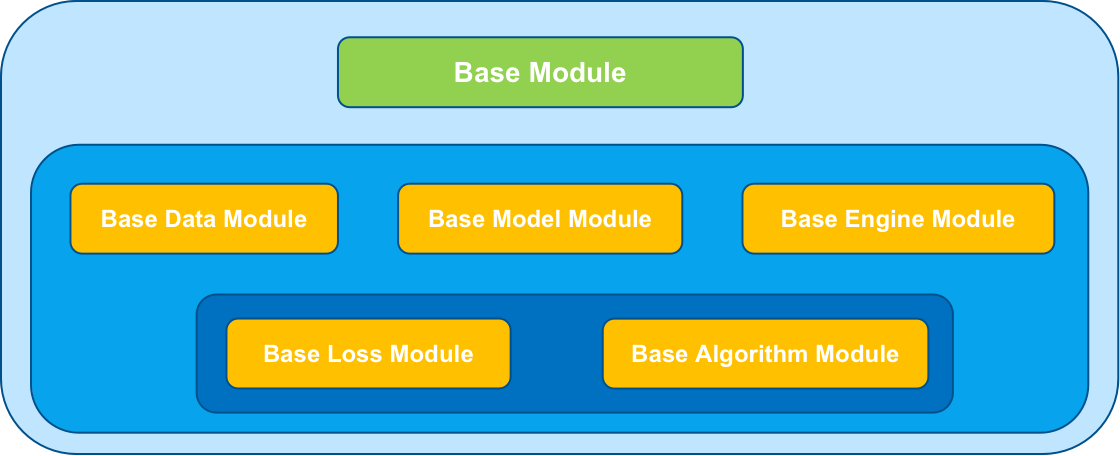
A base module takes in charge of the management of all modules, it’s to say that all modules (data module, algorithm module or engine module and so on) inherit from the base module, like the image show below. This design is convenient to improve the communication of independent modules from top to bottom.
- Organization
The importation and scheduling of modules is qualified by Registry Mechanics. A new module can be easily applied by two lines code:
 from dolphin.utils import Registers, base

 @Registers.backbone.register
 class ResNet(base.BaseModelModule):
     def __init__():
         ...